Convert a song to MIDI in your browser
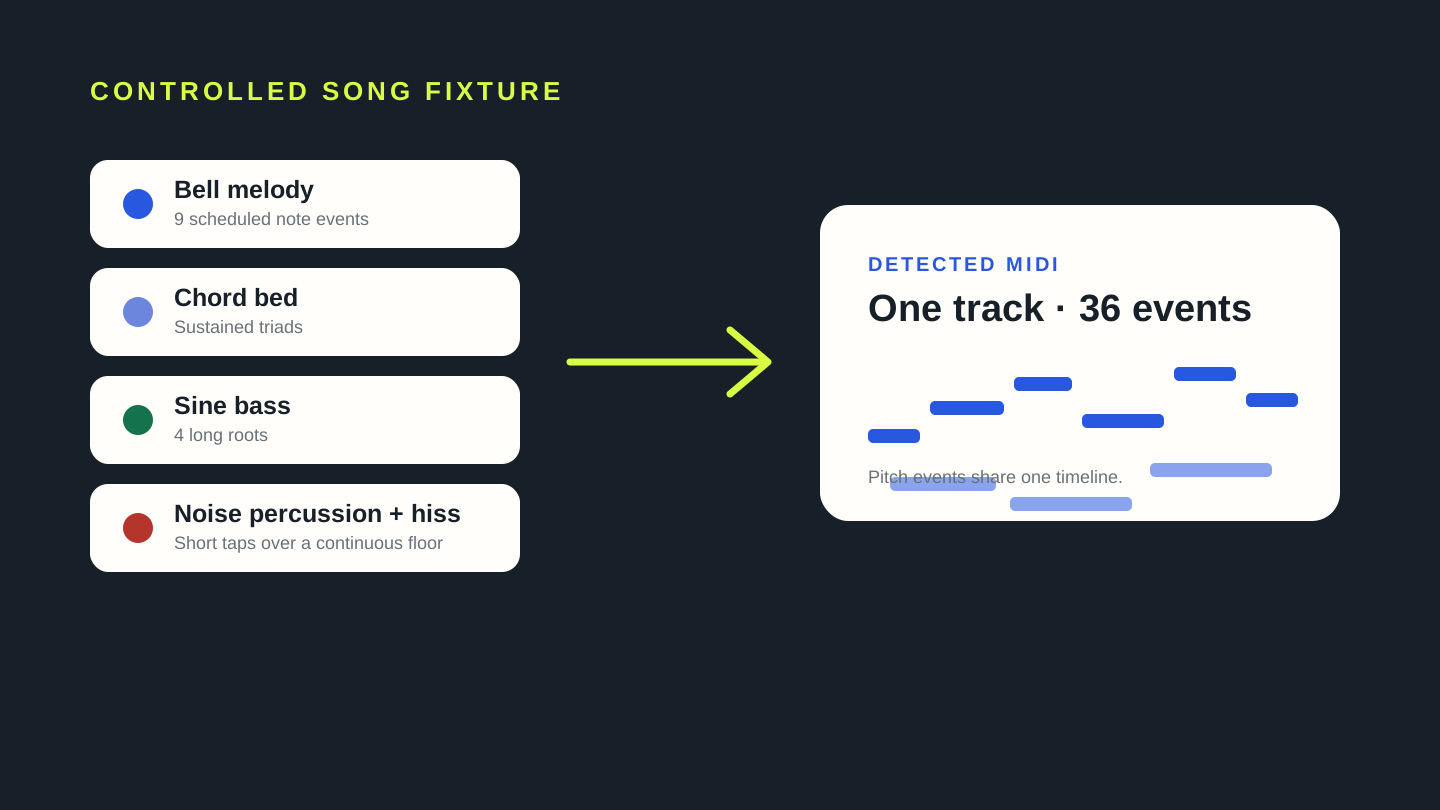
Choose a song file above. Miditap decodes it locally and writes the detected notes to one standard MIDI track. A mixed song is not a lossless format conversion: expect an editable pitch draft, not separated drums, bass, chords, and melody. In our controlled arrangement, all nine scheduled melody notes appeared, while the complete one-track result contained 36 note events.
How to convert a song to MIDI
- Choose an audio file in the converter above.
- Wait while this tab decodes the recording and estimates pitched events.
- Download the
.midfile, open it in a DAW or notation editor, and keep the useful notes.
The downloaded file stores note instructions, not the original sound. Instrument tone, lyrics, reverb, and percussion are not embedded in MIDI. A clear solo line is easier to turn into a clean note sequence than a finished mix whose parts overlap.
Our controlled song-to-MIDI test
We generated a new 12.8-second miniature arrangement and encoded it as 24-bit mono AIFF PCM at 44.1 kHz. It combines a bell-like melody, sustained electric-piano-style triads, sine bass, and quiet beat-aligned noise taps. The noise condition is continuous deterministic tape hiss plus those short taps, with no injected hum.
The scheduled melody was E4, G4, A4, B4, A4, G4, E4, D4, E4. We selected that AIFF in the current Miditap build, downloaded the MIDI, and parsed it with @tonejs/midi. Each of those nine melody events was present near its scheduled onset. The complete output was a 393-byte MIDI file with one track and 36 note events spanning C2 through B4.
Melody, chord bed, bass, and noise percussion.
E4 · G4 · A4 · B4 · A4 · G4 · E4 · D4 · E4
All nine melody events appeared among the mixed pitch detections.
| scheduled melody | scheduled start | detected start | detected duration | observation |
|---|---|---|---|---|
| E4 | 0.650s | 0.650s | 0.812s | Pitch and onset matched the schedule |
| G4 | 1.650s | 1.660s | 0.814s | Pitch present; onset 0.010s later |
| A4 | 2.650s | 2.648s | 0.813s | Pitch present; onset 0.002s earlier |
| B4 | 4.150s | 4.147s | 0.778s | Pitch present; onset 0.003s earlier |
| A4 | 5.150s | 5.157s | 0.802s | Pitch present; onset 0.007s later |
| G4 | 6.150s | 6.146s | 0.824s | Pitch present; onset 0.004s earlier |
| E4 | 7.650s | 7.655s | 0.814s | Pitch present; onset 0.005s later |
| D4 | 8.650s | 8.690s | 0.778s | Pitch present; onset 0.040s later |
| E4 | 9.650s | 9.653s | 1.116s | Pitch present; onset 0.003s later |
The source contains intentional accompaniment pitches, so the other 27 detected events cannot all be labeled errors. This test verifies melody presence and documents the one-track output; it does not measure instrument separation or prove performance on commercial recordings.
Why a whole song becomes a draft
At many moments in this fixture, melody, chord tones, and bass sound together. The detector writes plausible pitches into one timeline, but the output has no label saying which source layer produced a note. Noise taps and hiss add energy without becoming named stems. That is why a whole-song result needs listening and editing even when the lead melody is present.
For a cleaner result, start from a solo performance, an isolated stem, or the least processed mix you have permission to use. If the song is already mixed, remove obvious non-musical noise when possible and plan to delete duplicate fragments, correct octaves, and separate parts by hand.
Song to MIDI questions
Can I convert a song to MIDI for free?
The converter on this page runs in the browser without an account. It creates one MIDI track from one selected file.
Does it preserve every instrument?
No. This workflow detects pitches in the mixed audio and writes them into one track. It does not recover the original instruments or stems.
Can it convert a full song with drums?
It can analyze the file, but drums and other unpitched transients are not reliably represented as a useful melodic MIDI part. Dense overlap also makes pitch assignment harder. Treat the result as a draft.
Why are there more notes than the melody?
A song may contain chord tones, bass notes, harmonics, and fragments from overlapping sounds. Our dated fixture scheduled nine melody notes but produced 36 detected events across the complete arrangement.
Is the song uploaded?
Miditap reads the selected file, runs the note model, and builds the MIDI inside this browser tab. The test did not require an audio upload endpoint.
Reproduce this test
- Generator:
content-ops/experiments/generate-song-to-midi-fixture.mjs - Input:
test-fixtures/song-to-midi-2026-11-04/mini-arrangement-tape-hiss.aiff - Browser runner:
content-ops/experiments/test-song-to-midi-2026-11-04.mjs - Raw result:
content-ops/experiments/song-to-midi-2026-11-04-results.json - MIDI output:
test-output/song-to-midi-2026-11-04/mini-arrangement-tape-hiss.mid