Turn a hummed melody into editable MIDI
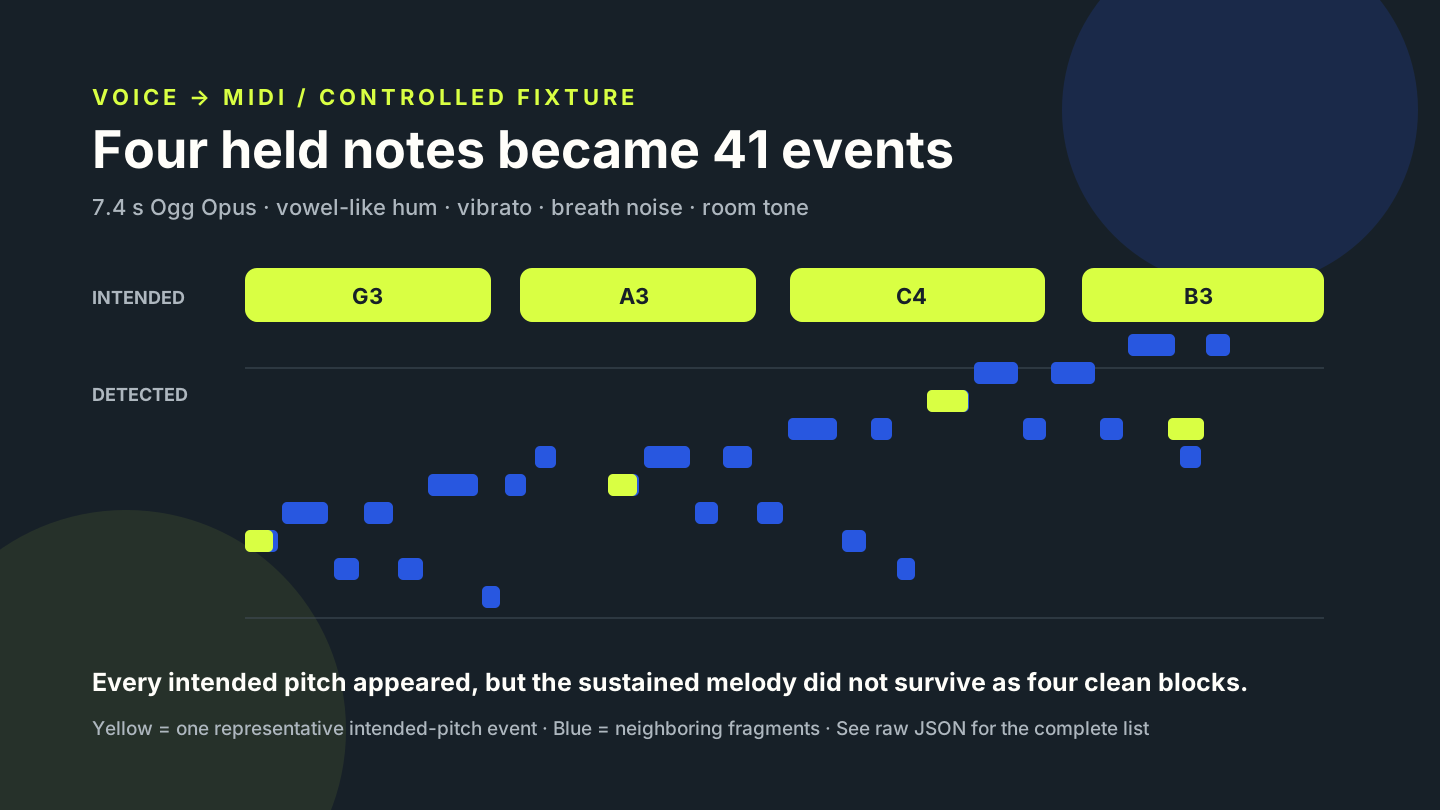
Choose a recording with one clear sung or hummed line in the Miditap converter. The browser estimates pitches and writes a MIDI file locally. In our controlled humming test, all four intended pitch names appeared, but vibrato and breath noise split the phrase into 41 short note events—so the result was a cleanup draft, not a finished melody.
How to convert voice to MIDI
- Record one person singing or humming a melody without backing music.
- Open the voice to MIDI converter and choose the audio file.
- Download the
.midresult and compare its piano roll with the recording. - Join fragments that belong to one sustained note, then correct pitch and timing only after listening.
MIDI stores note events, not the sound of a voice. The output can drive a synth or virtual instrument, but it does not preserve words, vowel tone, breath, or the original recording. Spoken voice also does not behave like a stable melody; use a sung or hummed line when the goal is pitched MIDI.
Our voice-to-MIDI test
We generated a new 7.4-second mono phrase designed to resemble vowel-like humming. It contained four sustained targets—G3, A3, C4, and B3—with a 5.2 Hz synthetic vibrato. The source also contained deterministic breath noise, low room tone, and a 120 Hz electrical hum. We encoded the 44.1 kHz PCM source as a 64 kbps Ogg Opus file, submitted that file to the current Miditap build, downloaded the MIDI, and parsed every note event with @tonejs/midi.
Mono synthetic humming with vibrato and controlled noise.
Each target pitch name appeared at least once in the output.
The event range was F3 through D♯4; the MIDI file was 412 bytes.
| detected pitch | event count | relationship to fixture | what the count shows |
|---|---|---|---|
| A♯3 | 6 | Not an intended target | Most frequent neighboring pitch |
| A3 | 5 | Intended target | Appeared in several short events |
| B3 | 5 | Intended target | Appeared in several short events |
| C4 | 5 | Intended target | Appeared in several short events |
| C♯4 | 4 | Not an intended target | Neighboring fragments around the upper phrase |
| D4 | 4 | Not an intended target | Neighboring fragments after the C4 target |
| G♯3 | 4 | Not an intended target | Neighboring fragments around lower targets |
| F♯3 | 3 | Not an intended target | Short lower fragments |
| D♯4 | 2 | Not an intended target | Upper fragments |
| G3 | 2 | Intended target | Opening target was detected, then split |
| F3 | 1 | Not an intended target | Single lower fragment |
The counts above come from one reproducible synthetic fixture. They do not measure a general voice-to-MIDI accuracy rate, and they do not isolate which unwanted event came from vibrato, harmonics, noise, or model behavior.
Why one hummed note became several MIDI notes
A sustained human-like tone is not a fixed sine wave. In this fixture the pitch was intentionally modulated, and the waveform contained harmonics plus breath-like noise. The resulting MIDI moved through neighboring semitones instead of holding four clean blocks. The output included the intended pitch names, but those names alone did not preserve the intended note boundaries.
For this result, cleanup should start by listening and identifying the four intended regions. Within each region, keep the note that best matches the audible center and merge or remove neighboring fragments. Do not delete every short event by rule: a real performance may contain intentional grace notes or pitch changes. The known fixture lets us label these fragments because its target sequence was fixed before conversion.
Voice to MIDI questions
Can I use singing instead of humming?
Yes, if the recording has one prominent melodic line. Lyrics introduce changing vowels and consonants, so inspect the result rather than assuming each sung syllable will produce one clean note.
Does voice to MIDI preserve my voice?
No. MIDI contains detected note instructions. Keep the original audio if you need the singer’s timbre, words, breaths, or expression.
Why are there so many short notes?
In this controlled test, four sustained targets produced 41 events across eleven pitch names. Vibrato, harmonics, noise, and changing amplitude are possible contributors, but the event list cannot assign a single cause to each fragment.
Should I remove noise before converting?
Test a short excerpt before and after careful cleanup while keeping the same trim and level. Compare the event lists. Noise reduction can change the waveform, so improvement should be measured rather than assumed.
Is the conversion private?
Miditap decodes the chosen file, runs the bundled note model, and writes the MIDI in the browser tab. The test used the same local workflow as the main converter.
Reproduce this voice test
- Generator:
content-ops/experiments/generate-voice-to-midi-fixture.mjs - Input:
test-fixtures/voice-to-midi-2026-11-01/vowel-hum-room-noise.ogg - Test runner:
content-ops/experiments/test-voice-to-midi-2026-11-01.mjs - Raw result:
content-ops/experiments/voice-to-midi-2026-11-01-results.json - MIDI output:
test-output/voice-to-midi-2026-11-01/vowel-hum-room-noise.mid